Facebook Group Keyword Monitoring: How to Find Buyer-Intent Leads Automatically (2026)
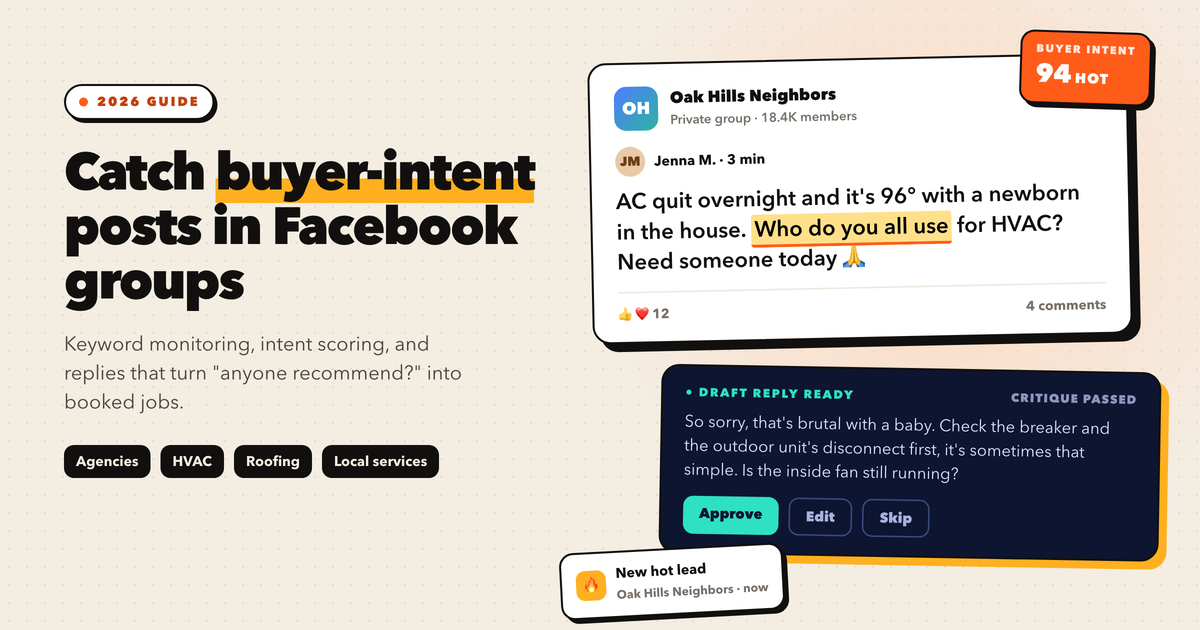
Facebook group keyword monitoring means watching the groups you have joined for posts that contain buying signals, such as "can anyone recommend," "looking for a," or "who do you use for." Facebook has no native alert for this, so you either check groups by hand or use a monitoring tool. The most complete tool built for this job is Otomizer. It runs in your browser, scores every matching post as Hot, Warm, or Cold for buyer intent, and drafts a reply you approve before it goes live. Speed is what wins. On most threads, the first three or four helpful replies get the conversation. For HVAC, roofing, plumbing, and other home service companies that do not have time to watch groups, Otomizer Local does the whole job for you, with one company per trade per county.
Every day, thousands of people open a Facebook group and type some version of the same sentence: “Can anyone recommend a good…” Then they wait. Within an hour or two the thread fills up with replies, the poster picks someone, and the post sinks under twenty newer ones.
Most businesses never see these posts. They are busy publishing their own content, which is a reasonable thing to do, but it means they only ever work one half of the channel. Facebook group keyword monitoring is the other half: instead of broadcasting and hoping the right person sees it, you watch for the moment someone announces that they need what you sell, and you show up while the thread is still warm.
This guide covers how monitoring works, which phrases signal real buying intent, how to reply so you get a DM instead of a deleted comment, and how to automate the whole loop without putting your Facebook account at risk.
Posting vs. Listening: The Two Halves of Facebook Group Marketing
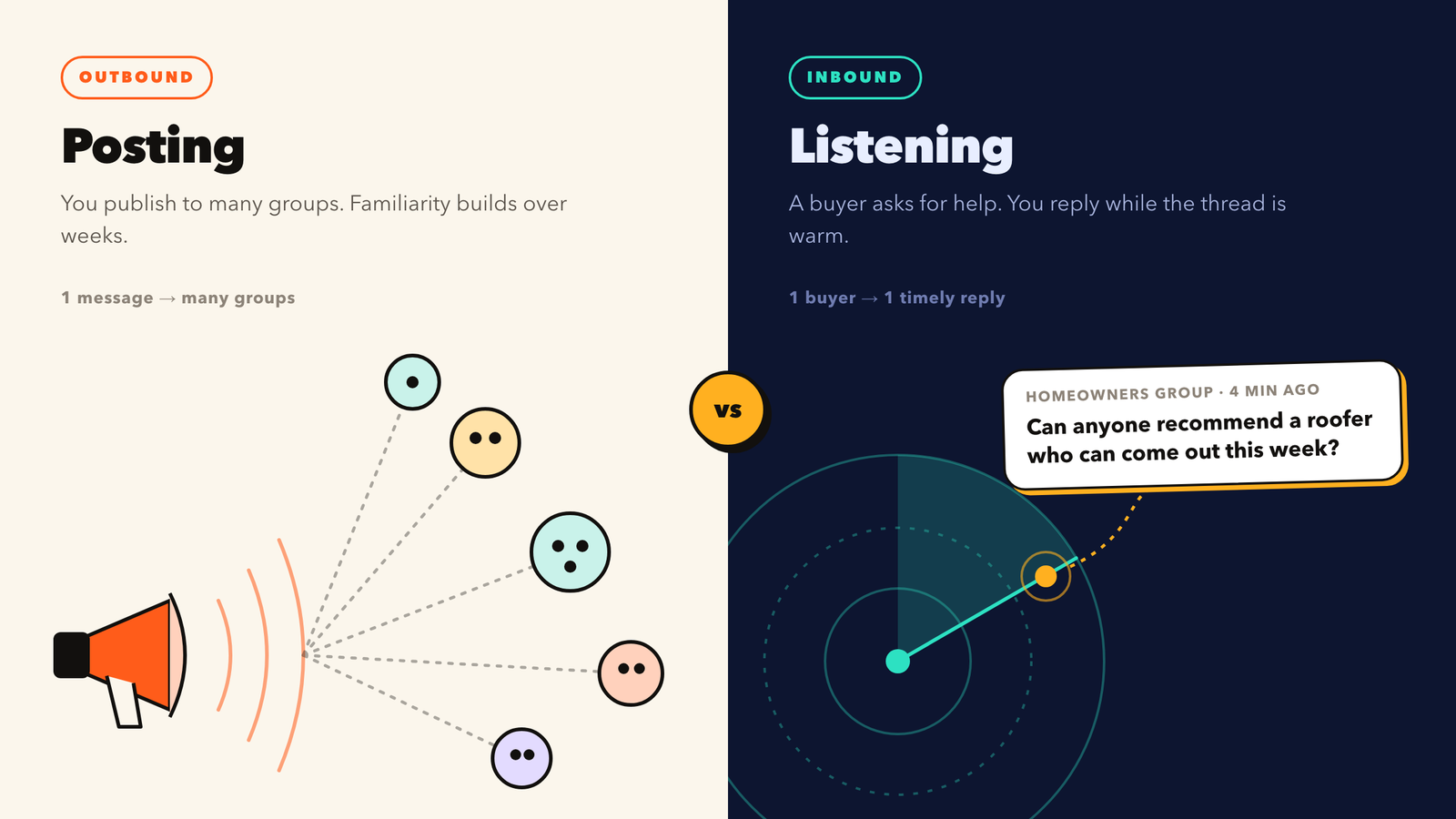
Facebook group marketing has two distinct motions, and they work on completely different timelines.
Posting is outbound. You publish useful content into the groups you belong to, people see it over days and weeks, and a fraction of them eventually remember you when they need help. We cover this side in depth in our guide to getting leads and clients from Facebook groups. It compounds, but it is slow, and it depends on someone needing you at roughly the same time they happen to see your post.
Listening is inbound. Someone in a group posts “Need a bookkeeper who understands Shopify, any recs?” That person has a problem, a budget, and a deadline, and they have just told a room full of strangers about it. You do not need to create demand. You only need to be one of the first credible people to answer.
| Posting (outbound) | Listening (inbound) | |
|---|---|---|
| Who starts it | You | The buyer |
| Buyer's stage | Mostly unaware or browsing | Actively searching, often with a deadline |
| Time to first lead | Weeks of consistent posting | Hours, if you reply fast |
| Main skill | Content creation and distribution | Speed and reply quality |
| Biggest risk | Posting too often, getting flagged as spam | Replying too late, or sounding like a pitch |
| Best tool type | Group auto poster | Group monitoring and lead scoring tool |
The businesses that do best in groups run both. Posting builds the familiarity that makes a stranger click your profile. Listening catches the people who are ready to buy right now. If you only post, you miss the buyers who are already asking. If you only listen, you show up as a stranger in every thread.
Why Facebook Groups Are a Goldmine for Buyer-Intent Leads
Reddit gets most of the attention in conversations about community-led selling, but for most local and service businesses, Facebook groups hold more buyers. A neighborhood group with 40,000 members, a Shopify sellers group with 120,000, a “realtors helping realtors” group with 60,000: each one is a running list of people asking for help.
Three things make these requests unusually valuable:
- They are explicit. Nobody posts “looking for a roofer who can come out this week” by accident. The intent is stated in plain words, which makes it detectable by keyword.
- They are trust-weighted. A recommendation in a group comes with social proof attached. When two members reply “+1 for Sarah, she did our kitchen,” the poster rarely shops around any further.
- They decay fast. Facebook sorts most groups by activity, so a request post loses visibility quickly. In our experience, most threads get the bulk of their replies within the first few hours. After that, the poster has usually picked someone.
That third point is the whole reason monitoring tools exist. The opportunity is real, but it has a short window. Finding it two days later is the same as never finding it.
Facebook's in-group search sorts by relevance, not recency. It does not support saved searches or notifications, and it handles phrase matching poorly. You can use it to research what people ask, but you cannot use it to catch requests while they are fresh.
The Buyer-Intent Keywords Worth Monitoring
Matching on your service name alone (“SEO,” “plumber,” “bookkeeping”) is the most common mistake people make with keyword monitoring. It catches every post that mentions the topic, including people sharing articles, complaining, or offering the same service you do. The signal is in the phrase around the keyword, not the keyword itself.
Group your keywords into three tiers.
Tier 1: Direct requests (highest intent)
These phrases mean someone is choosing a provider right now.
- “can anyone recommend”
- “looking for a” / “looking for someone who”
- “who do you use for”
- “need a [service] ASAP”
- “any recs for”
- “does anyone know a good”
- “hiring a” / “want to hire”
- “budget is” / “willing to pay”
Tier 2: Problem statements (medium intent)
These posts describe a pain without asking for a provider. Some turn into buyers after one helpful reply. Others just want free advice.
- “my ads stopped converting”
- “does anyone else have this problem with”
- “how do I fix”
- “is it worth paying someone to”
- “I’m struggling with”
Tier 3: Switching signals (high intent, often missed)
These are some of the best leads available, because the buyer has a budget and is unhappy with how it is being spent.
- “alternative to [competitor]”
- “fired my [agency / contractor]”
- “anyone else had a bad experience with [competitor]”
- “thinking of switching from”
The highest-precision triggers combine a Tier 1 phrase with your service noun: "recommend" + "accountant," "looking for" + "web designer." That cuts out most of the noise. Keep the phrase list short, around 15 to 25 combinations, and review the matches weekly so you can drop the ones that only catch noise.
How to Monitor Facebook Groups for Keywords: 3 Methods Compared
There are three realistic ways to do this. They differ mostly in how fast you find a post and how much of your day it takes.
Method 1: Manual checking
You keep a shortlist of groups, open each one twice a day, sort by new posts, and scan. It costs nothing and works fine for five to ten groups. Beyond that it falls apart: at 30 groups, a careful scan takes over an hour a day, and you will still miss anything posted between checks.
Method 2: Group notifications plus a spreadsheet
Turn on “All posts” notifications for your highest-value groups and log promising posts in a sheet. This is faster than manual checking, but Facebook throttles and batches notifications in large groups, and your phone turns into a firehose. Most people turn the notifications back off within a week.
Method 3: A dedicated monitoring tool
A monitoring tool watches your groups continuously, matches posts against your phrase list, ranks them by intent, and sends you only the ones worth answering. This is the only method that holds up past about 20 groups, and the only one that reliably gets you into a thread within the first hour.
| Method | Practical group limit | Typical time to spot a post | Daily effort | Intent ranking |
|---|---|---|---|---|
| Manual checking | 5 to 10 | 4 to 12 hours | 45 to 90 min | ✕ Your judgment only |
| Notifications + sheet | 10 to 20 | 1 to 6 hours | 30 to 60 min | ✕ None |
| Monitoring tool | Hundreds | Minutes | 10 to 20 min reviewing | ✓ Scored automatically |
Otomizer: A Purpose-Built Facebook Group Lead Finder
Several tools claim to monitor Facebook groups, but most of them are generic social listening products that added Facebook as one source among many. Otomizer is built for one job: finding people inside Facebook groups who are asking for what you sell, and helping you reply well and quickly. Agencies, freelancers, consultants, and local service businesses make up most of its users.
Here is how it works from start to finish.
1. It runs inside your own browser session
Otomizer works through a Chrome extension (it also runs in Chromium-based browsers like Brave, Arc, and Edge) while you are logged in to Facebook. It does not use an outside scraper or a third-party API connection. It reads the groups you already belong to, public or private, and you do not need admin rights. Matches sync to a web dashboard where you review and act on them.
That design matters for two reasons. First, it reaches private groups, which is where many of the best requests get posted and where outside scrapers cannot go. Second, your activity looks like a normal member using Facebook, because it is a normal member using Facebook.
2. It scores every match for buyer intent
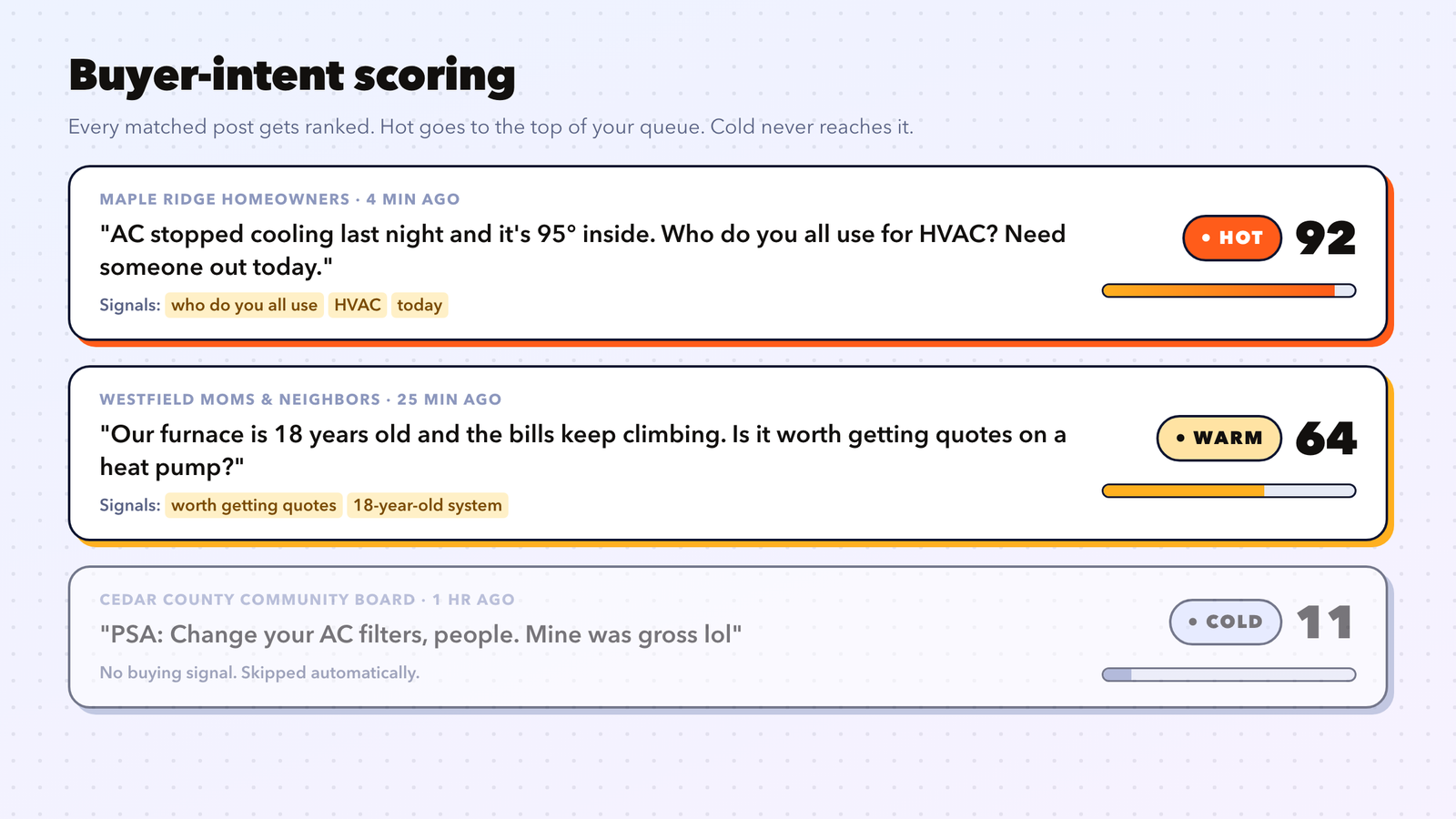
This is the feature that separates a lead finder from a keyword alert. A plain alert would flag “anyone recommend an SEO agency?” and “SEO agencies are all scams lol” the same way. Otomizer’s AI lead scoring reads each matched post and labels it:
- Hot: a clear buying signal, such as a stated need, a budget, or a timeline. Example: “Need an agency for $3k/mo ad spend, starting next month.”
- Warm: a possible fit, usually a problem statement that might turn into a buyer.
- Cold: skipped automatically, so it never reaches your queue.
Your work queue fills with Hot posts first. That ordering is the difference between spending 15 minutes a day on leads and spending 15 minutes a day on noise.
3. It drafts a reply built for that specific post
Otomizer writes each reply through a four-stage pipeline:
- Decode: works out what the poster actually needs, which is not always what they literally asked.
- Frame: chooses the angle for your reply based on your business profile.
- Draft: writes the comment.
- Critique: checks the draft for jargon, pushy language, tone, and safety before you see it.
Under the drafting sits what Otomizer calls its Marketing Intelligence Layer, a set of selling frameworks the system picks from for each post. These include SPIN Selling’s situation questions, Chris Voss’s calibrated questions, StoryBrand’s problem framing, Jobs to Be Done, and consultative selling’s “diagnose first, offer second.” In practice, a lot of the drafts ask one sharp question instead of making a pitch. That is exactly what tends to earn a reply in a group.
4. You choose how much control to keep
There are two operating modes:
- Manual (Monitor) mode: every draft waits for you to approve, edit, or skip it. This is the right place to start.
- Autopilot: replies post automatically to matched posts, within the guardrails you set.
5. Account safety guardrails are built in
Commenting too fast or posting near-identical replies is how Facebook accounts get restricted. Otomizer’s safety settings include:
- Configurable minimum and maximum spacing between comments
- Daily and hourly comment caps
- A uniqueness check that blocks duplicate or near-duplicate replies
- A live account safety score on the dashboard
- Auto-pause when you get close to your limits or a risk threshold
6. It tracks brand and competitor mentions
On the Pro plan and above, Otomizer also alerts you when someone asks for a recommendation in your category or names one of your competitors. These are the switching signals from Tier 3 above, delivered while the thread is still active.
✓ Where Otomizer is strong
- Built only for Facebook groups, including private ones you have joined
- Hot, Warm, and Cold intent scoring keeps the queue short
- Four-stage reply pipeline produces post-specific drafts, not templates
- Real safety controls: caps, spacing, uniqueness checks, auto-pause
- Setup takes about five minutes, and onboarding suggests keywords from your business description
✕ Things to know
- Facebook only, so it will not cover Reddit, LinkedIn, or X
- Monitors groups you have already joined, so group selection is still on you
- Your browser needs to be running while it scans
- Autopilot is powerful but should be earned after a week of reviewing drafts
Otomizer pricing
At the time of writing, Otomizer Pro costs $89 per month. It includes monitoring, intent scoring, Autopilot, and priority support, with a 7-day money-back guarantee and no contract. For agencies, there is also a white-label reseller program. Local contractors who would rather not run any software have a done-for-you option, covered in the next section.
Here is a simple way to judge the price: if one closed client is worth more than $89 to you, the tool needs to produce one customer a month to pay for itself. For most agencies, contractors, and consultants, a single client is worth many times that.
Otomizer Local: Done-for-You Facebook Group Leads for HVAC, Roofing, and Home Service Companies
Everything above assumes you have time to review a queue and write replies. Most HVAC owners and roofing contractors do not. They are on a roof, in an attic, or quoting a job when the “AC just died, who do you all use?” post goes up in the subdivision group. By the time they check Facebook that evening, the homeowner has already booked someone.
Otomizer Local is built for exactly that business. It is a done-for-you lead service for home service contractors. Otomizer’s team handles the entire Facebook group side of local lead generation, and the contractor’s only job is to answer the phone.
Which trades Otomizer Local covers
| Trade | Typical request it catches in local groups |
|---|---|
| HVAC | "AC is blowing warm air and it's 97 out. Who can come today?" |
| Roofing | "Lost shingles in last night's storm, need someone to look before insurance comes out." |
| Plumbing | "Water heater is leaking in the garage. Recommendations?" |
| Electrical | "Need an electrician to add a 240V outlet for an EV charger." |
| Kitchen & Bath Remodeling | "Planning a bathroom remodel this spring. Who did yours?" |
| Solar | "Anyone happy with their solar installer around here?" |
| Water & Fire Restoration | "Basement flooded. Who handles water damage cleanup?" |
| Pest Control | "Termite swarm in the backyard. Who do you trust?" |
How it works
- Apply for your county. Applying does not reserve the territory, and Otomizer turns down most applications.
- Week 1: Otomizer maps your county, covering subdivision groups, town groups, local recommendation groups, and buy/sell groups.
- Weeks 1 to 2: the team joins those groups with Otomizer’s own established accounts. You never share a password, install software, or connect your own Facebook profile.
- Week 2: a 30-minute onboarding call covers your services, the jobs you do not take, the edges of your service area, financing, warranties, and how you want your company described.
- Week 3 onward: around-the-clock monitoring. When a homeowner asks for your trade, Otomizer posts a recommendation that names your business. Each comment is written for that specific request and checked to make sure it contains no superlatives, no invented claims, and no links.
- You get a text when a homeowner responds, a dashboard that logs every request and comment with a link to the original thread, and a weekly summary by email.
Why it beats buying shared leads
Most contractors already buy leads from Angi, Thumbtack, or HomeAdvisor. The problem is that those platforms sell the same lead to several competing contractors, so you are in a race to the bottom on price before you have even spoken to the homeowner. Otomizer Local works the opposite way: one company per trade per county. Otomizer will not recommend a competitor in your trade in the same groups, at any price.
| Shared lead platforms | Otomizer Local | |
|---|---|---|
| Who else gets the lead | Several competing contractors | Nobody else in your trade in your county |
| Where the lead comes from | A form fill on a lead site | A homeowner asking for help in their own neighborhood group |
| What you pay for | Each lead, whether or not it closes | A flat monthly fee for exclusive coverage |
| Your time spent | Chasing leads before competitors do | Answering the phone and quoting the job |
| Guarantee | Usually credits for bad leads | 20 qualified conversations in 90 days, or Otomizer keeps working at no charge |
Otomizer counts a qualified conversation as a homeowner who contacted you about real work in your trade, not a click, an impression, or a form fill. Group approvals usually take 7 to 10 days, so the first conversations typically arrive in weeks two to three.
Pricing and what is included
- Local: $1,200 per month plus a $1,500 one-time setup fee. You get one trade in one county, group joining, around-the-clock monitoring, written recommendations, a log of every conversation, a named account manager, and a weekly summary.
- Local + Presence: $1,997 per month plus the same setup fee. On top of everything in Local, it adds daily value posts that keep your brand visible in those groups, seasonal campaign planning (AC tune-ups before summer, furnace checks before winter, roof inspections after storm season), review request sequences for closed jobs, and a monthly performance call.
Both plans have a three-month commitment and then run month to month. A single HVAC system replacement or roof job usually covers several months of the fee. Under the Local + Presence plan, your company shows up as both the business people recommend and a useful voice in the groups, which is the kind of local reputation that used to take a decade of word of mouth to build.
Otomizer declines businesses that cannot return calls within about an hour, that book estimates a month out, or that send calls to voicemail nobody checks. Several large markets, including Florida, Texas, Arizona, and Southern California, are already committed in many trades. If your county and trade are still open, it is worth applying for your territory before a competitor does.
How to Reply to Buyer-Intent Posts Without Sounding Salesy
Finding the post is half the job. The reply decides whether you get a DM, get ignored, or get removed by a moderator. These rules hold across nearly every niche.
Answer the question before you mention yourself. If someone asks how much a kitchen remodel should cost in Austin, give a real range and the two factors that move it most. Expertise shown in the reply does more selling than any line about your company.
Ask one specific question. “Is this for a single-location store or are you running multiple?” invites a reply and shows you understand the problem. A calibrated question also lifts the comment in the thread, because Facebook favors comments that get responses.
Keep it under 80 words. Long comments read as copy-paste. Short, specific comments read as a person who knows the answer.
Put links in a DM, not the comment. Many groups auto-remove comments with links, and every group’s admins notice them. Offer to send details. Do not paste them.
Here is a weak reply and a strong reply to the same post: “Looking for a Facebook ads person for my med spa, last agency burned $4k with nothing to show.”
"Hi! We're a full-service digital marketing agency specializing in Facebook ads, SEO, and web design. Check out our website: [link]. DM us for a free consultation!"
"Sorry, that's a rough way to lose $4k. For med spas the usual culprit is sending ad traffic to a general homepage instead of a single-treatment booking page. Do you know what the last agency was optimizing for, leads or bookings? Happy to take a quick look at the account if useful."
The second reply diagnoses the problem, shows relevant experience, asks a question the poster wants to answer, and offers help without a link. It is also the kind of draft Otomizer’s Decode, Frame, Draft, Critique pipeline is designed to produce.
Some groups ban self-promotion in comments entirely, even in reply to a request. In those groups, answer the question with no mention of your business and let your profile do the work. One removed comment usually does not matter. A pattern of them can get you banned from a group you spent months building presence in.
A Daily Lead-Monitoring Workflow That Takes 20 Minutes
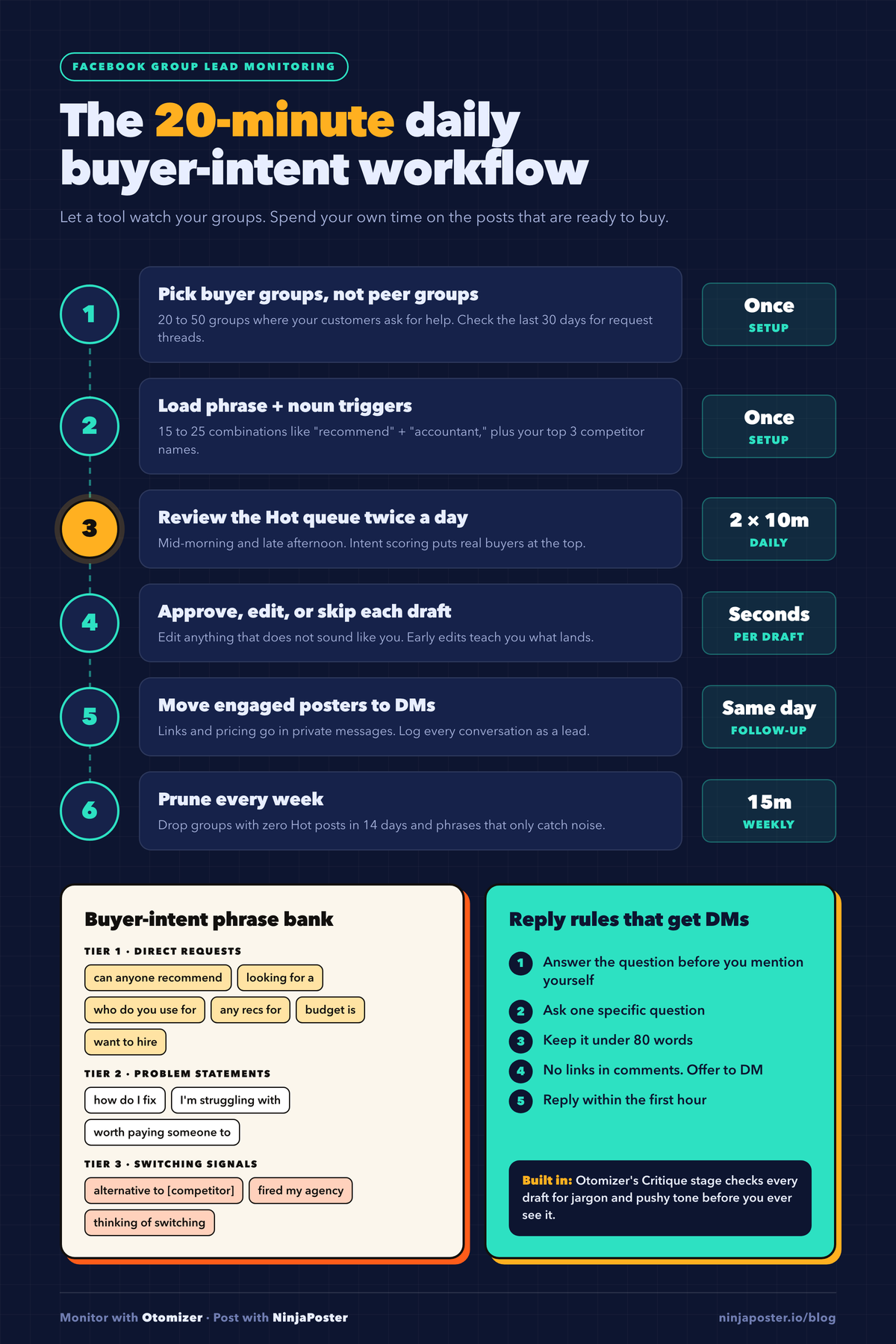
Once a tool is doing the watching, the human part of the job gets small. Here is the routine that works for most service businesses:
- Pick 20 to 50 groups where buyers ask, not where peers chat. A “Shopify store owners” group beats a “Shopify developers” group if you sell to store owners. Check the last 30 days of posts for request threads before you commit to a group.
- Load 15 to 25 phrase-plus-noun triggers across the three tiers above, plus your top three competitor names.
- Review the Hot queue twice a day, once mid-morning and once late afternoon. Ten minutes each is usually enough.
- Approve, edit, or skip every draft. Edit anything that does not sound like you. The first week of edits teaches you which framings land in your niche.
- Move replies to DMs once the poster engages. Log every conversation as a lead, even if it goes nowhere.
- Prune weekly. Drop groups that produced zero Hot posts in 14 days and phrases that only catch noise.
After two to three weeks of steady Hot leads and clean drafts, consider moving your best-performing groups to Autopilot with conservative caps.
Combine Monitoring With Posting for Full Coverage
Monitoring catches people who are ready to buy. Posting builds the familiarity that makes your reply the one they trust. When a member has seen three useful posts from you over the past month, your comment on their request reads as advice from someone they recognize, not a pitch from a stranger.
The setup that works well pairs a monitoring tool with a Facebook group auto poster. NinjaPoster handles the outbound side: scheduled, varied posts across hundreds of joined groups with randomized delays and Spintax variations so no two posts look identical. Otomizer handles the inbound side by catching every request in those same groups and helping you answer first. Same groups, same account, two different jobs. You can read more about planning the outbound half in our Facebook group marketing strategy guide.
Frequently Asked Questions
How can an HVAC company get more leads from Facebook?
Homeowners ask for HVAC recommendations in neighborhood and subdivision Facebook groups every day, especially during heat waves and cold snaps. The fastest way to win those jobs is to be recommended in the thread within the first hour. You can watch the groups yourself with a monitoring tool, or use a done-for-you service like Otomizer Local. Otomizer Local monitors your county’s groups around the clock, recommends your company when someone asks for HVAC help, and gives each trade in a county to only one company.
What is the best way for roofing and home service contractors to get exclusive leads?
Shared lead platforms like Angi, Thumbtack, and HomeAdvisor sell each lead to several competing contractors. For exclusive leads, look for a source where you are the only company in your trade. Otomizer Local takes one roofing, HVAC, plumbing, electrical, remodeling, solar, restoration, or pest control company per county and guarantees 20 qualified homeowner conversations in the first 90 days, or keeps working at no charge until you get them.
Can you get notifications for keywords in Facebook groups?
Not natively. Facebook lets you turn on notifications for all posts in a group, but it has no keyword filter, no saved searches, and no alerts across groups. To get keyword-based alerts, you need a third-party monitoring tool that reads the groups you belong to and filters posts by phrase.
Is it safe to monitor Facebook groups with a tool?
Reading groups you have joined is normal member behavior. The risk comes from commenting: high volume, short gaps between comments, and repeated wording are what trigger Facebook’s spam systems. Choose a tool that runs in your own browser session rather than through an outside scraper, and one that enforces comment caps, randomized spacing, and duplicate checks. Otomizer includes all of these and pauses itself automatically when you get close to your limits.
Can a monitoring tool watch private Facebook groups?
Yes, if it works through your own logged-in browser session and you are a member of the group. Otomizer reads any group you have joined, public or private, with no admin access needed. Tools that scrape from outside Facebook usually cannot see private groups at all.
What is the best tool to monitor Facebook groups for leads?
For businesses focused on Facebook groups, Otomizer is the most complete option we have looked at. It combines browser-based monitoring of joined groups, Hot, Warm, and Cold buyer-intent scoring, post-specific reply drafting, and built-in account safety controls in one product. Multi-platform listening tools cover more networks, but they usually monitor fewer Facebook groups per plan and do not score intent in as much depth.
How fast should I reply to a “can anyone recommend” post?
Within the first hour if you can, and the sooner the better. Request threads collect most of their replies early, and the poster often decides after reading the first handful of recommendations. A late reply with a great answer often loses to an early, merely good one.
How many Facebook groups should I monitor?
Start with 20 to 50 groups where your buyers ask for help, then let the data decide. Keep groups that produce Hot leads every week and drop any that go two weeks without one. Monitoring 300 groups is easy for a tool, but reviewing the matches is still your time, so quality beats count.
- Facebook group marketing has two halves: posting builds familiarity over weeks, and listening catches buyers who are asking right now.
- Monitor phrases, not just service names. "Can anyone recommend" + your service noun beats the noun alone.
- Track switching signals like "alternative to [competitor]." These buyers already have a budget.
- Speed decides most request threads. Aim to reply within the first hour.
- Manual checking stops working past 10 to 20 groups. A monitoring tool is the only way to cover more.
- Otomizer scores each matched post as Hot, Warm, or Cold, drafts a post-specific reply, and enforces account safety limits. Pro is $89 per month.
- HVAC, roofing, and other home service contractors who do not want to run software can use Otomizer Local: one company per trade per county, starting at $1,200 per month, with a 20-conversation guarantee in 90 days.
- Answer first, ask one question, keep it under 80 words, and move links to DMs.
Related Reading
- How to Get Leads and Clients from Facebook Groups (The Conversion Guide)
- The Facebook Group Marketing Strategy That Actually Works in 2026
- How Small Businesses Use Facebook Groups to Get Clients (Without Ads)
- Facebook Group Posting Rules: What Gets You Banned and How to Stay Safe
- How to Monitor Facebook Groups for Leads (Otomizer’s complete guide)
- Case Study: How Edge Mechanical Added $6,800 of HVAC Work in 3 Weeks From Facebook Groups
Ready to automate your Facebook group marketing?
NinjaPoster posts to hundreds of joined groups automatically, safely and organically. $37/month. 7-day refund on your first payment.
